
Version 8 FM
Version 8 FM
Contents of this Topic: Show
 |
Use the Next Topic
and Previous Topic arrows,
 and and  ,
in the Navigation Pane of the Knowledge
Base to move sequentially through the topics explaining
the tabs of the current screen. (The buttons are actually white
on the black background of the Navigation Pane.) ,
in the Navigation Pane of the Knowledge
Base to move sequentially through the topics explaining
the tabs of the current screen. (The buttons are actually white
on the black background of the Navigation Pane.) |
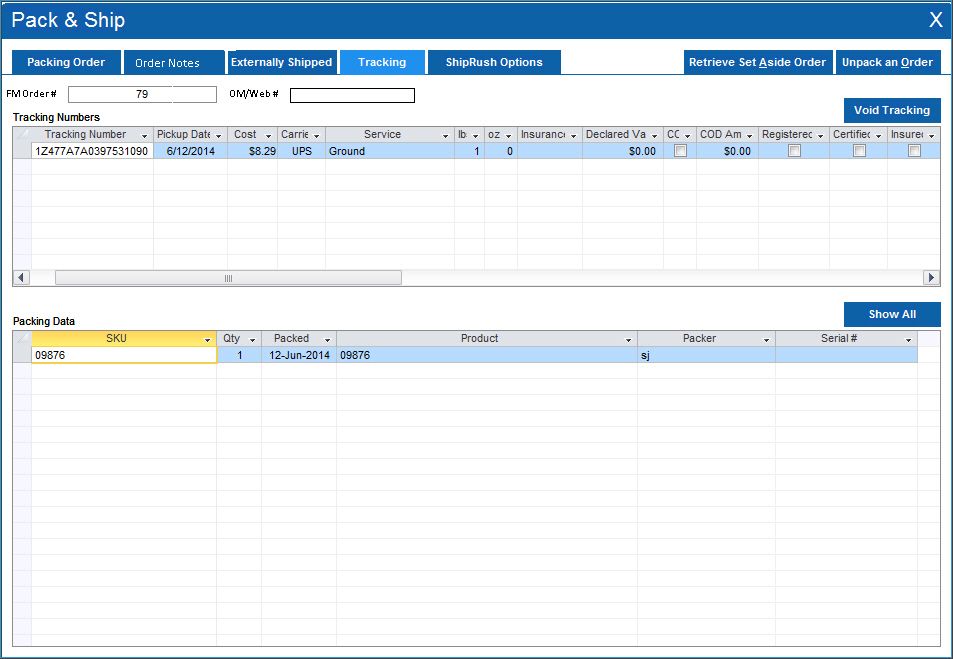
Use this tab to view packing data and view or void Tracking Numbers for a given Order.
When the screen opens, the first tracking number in the order is selected by default, and its Packing Data is displayed at the bottom of the form.
If the selected tracking number was voided, the packing data was also removed from the system.
If there is more than one tracking number associated with the order, select Show All to see packing information for all tracking numbers at once.
Created: 1/29/14
Revised: 6/19/15
Published: 08/19/15